
Developer: Cobalt Weaver Works
Published: 2026-10-01
Updated: 2026-10-01
Reviews
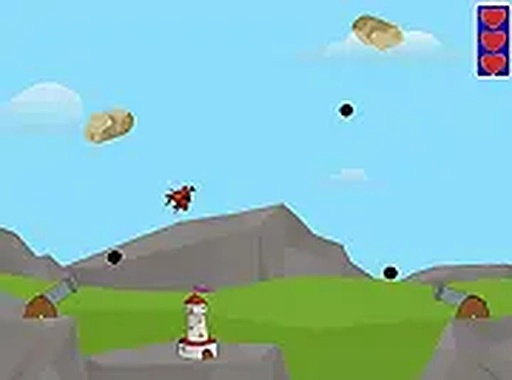
Sky Shield Defense focuses on a single, clear task: shoot falling rocks before they land. The mouse-aim and click-to-fire setup is immediately understandable, and the gradual difficulty increase keeps the game from overwhelming new players. Visual and audio feedback confirm hits without clutter, and the running score gives a sense of progress. The strategic layer—choosing which rocks to target first—adds depth beyond pure reflex. It suits players who enjoy real-time arcade challenges with simple controls and no installation required.
Description
Intercepting Falling Rocks
Sky Shield Defense gives players one job: stop rocks from reaching the ground. A mouse-controlled reticle moves across the screen, and clicking fires a projectile upward. A direct hit breaks a rock into smaller fragments, and those fragments must also be destroyed before they land. The game runs in real time, so there is no pause between waves or turns to plan. Rocks fall at different angles and speeds, which means players constantly shift their aim and decide which threat matters most right now.How Difficulty Builds
Early waves send a slow trickle of rocks, giving new players room to learn the controls and build aim. As the game progresses, rocks appear more frequently, and larger stones show up that need multiple hits to break apart. Some rocks descend in clusters, forcing quick targeting of the most immediate threats. The difficulty curve rises steadily rather than spiking, so the game stays challenging without becoming unfair. Players who improve their reaction time and accuracy naturally survive longer.Visual and Audio Cues
Successful shots trigger a brief particle effect, confirming that a rock has been destroyed. The background stays clean and uncluttered, keeping attention on the falling rocks. Audio feedback plays with each shot and rock break, reinforcing actions without distracting from the main task. A running score appears on the interface, letting players track progress after each wave. These elements combine to create a responsive feel that rewards precise play.Controls and Access
The game runs in desktop browsers with no downloads or installations. Players aim with the mouse and click to fire, and full-screen mode is available for a more focused view. Some versions may include keyboard shortcuts for faster responses. The control scheme is intentionally simple, making the game accessible to players of all ages and skill levels. There are no complex menus or tutorials to navigate; the focus remains on aiming and shooting. This straightforward design lowers the barrier to entry while maintaining depth through increasing difficulty.Strategy Beyond Reflexes
While Sky Shield Defense appears simple, it involves strategic choices. Players must decide which rocks to target first, prioritizing those closest to the ground. Larger rocks may require multiple shots, so attention must be allocated efficiently. The game rewards players who learn to anticipate rock trajectories and plan their shots accordingly. Over time, players develop a sense of rhythm and timing that improves their survival rate. This blend of quick reflexes and thoughtful prioritization gives the game a layer of depth beyond pure reaction speed.Compatibility
This H5 game runs smoothly on:
• Desktop computers (Windows / Mac) • Mobile phones (iPhone / Android)
• Tablets (iPad / Android)
🌐 Best experienced with Chrome, Safari, or Edge
FAQ
What type of game is Sky Shield Defense?
Sky Shield Defense is a browser-based action game with strategy and defense elements. Players control a targeting reticle with the mouse and click to fire projectiles at falling rocks. The goal is to destroy rocks before they hit the ground, and each hit splits a rock into smaller pieces that must also be destroyed.
Do I need to download anything to play Sky Shield Defense?
No. Sky Shield Defense is designed for desktop browsers and requires no downloads or installations. You open the game in your browser, aim with the mouse, and click to fire. Full-screen mode is available for a more immersive view, and some versions may include keyboard shortcuts for faster responses.
Is Sky Shield Defense suitable for beginners?
Yes. The controls are intentionally simple: move the mouse to aim and click to fire. Early waves introduce a slow trickle of rocks, giving newcomers time to learn the controls and develop their aim. There are no complex menus or tutorials to navigate, so the focus stays on the core action of aiming and shooting.
How does the difficulty increase in Sky Shield Defense?
The challenge escalates gradually. Early waves have fewer rocks, but as you advance, rocks appear more frequently and larger stones require multiple hits to break apart. Some rocks descend in clusters, demanding quick targeting of the most immediate threats. This steady rise keeps the game engaging without becoming frustrating.
What happens when a rock is hit in Sky Shield Defense?
A successful hit breaks a rock into smaller fragments. Those fragments continue falling and must also be destroyed to prevent damage. This means a single large rock can turn into several smaller targets, forcing you to adjust your aim quickly and prioritize the most dangerous pieces before they reach the ground.
Does Sky Shield Defense require strategy or just quick reflexes?
Both. While the game demands fast reactions, it also involves strategic choices. You must decide which rocks to target first, usually prioritizing those closest to the ground. Larger rocks need multiple shots, so you have to allocate attention efficiently. Players who anticipate trajectories and plan shots tend to survive longer.
Comments
Sign in to comment
You must be logged in before posting a review or rating.
No comments yet. Be the first to comment!






Editorial Notes