
Reviews
Cell Strategy Solitaire Puzzle offers a transparent take on solitaire where every card is visible from the start. The challenge comes from sequencing, free cell management, and deciding when to move groups versus single cards. Unlimited undo and smart hints lower frustration, while win rate and streak tracking add measurable progression. The clean visuals and auto-save suit extended or interrupted play. It is best for players who enjoy logic puzzles and methodical card games rather than fast action.
Description
Open Information, Closed Options
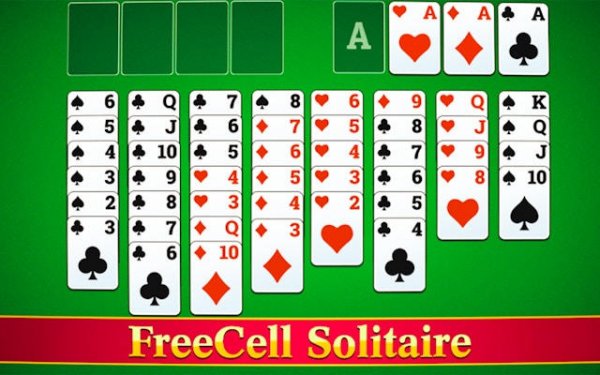
Every card in Cell Strategy Solitaire Puzzle sits face up across eight columns, so nothing is hidden. You can scan the entire layout before committing to a move, which shifts the challenge from memory to planning. Four free cells at the top left hold cards temporarily when a column blocks progress. The goal is to move all 52 cards to four foundation piles at the top right, sorted by suit from Ace to King. Because the board is fully visible, mistakes come from sequencing, not from surprise reveals.
Sequencing Rules That Shape Decisions
Cards move between columns only in descending order with alternating colors, such as a black six on a red seven. A valid sequence can be moved as a group, but only if enough free cells are available to hold the cards during the transfer. This rule makes free cell management a core part of each turn. Every move changes what sequences are possible, and the unlimited undo option lets you reverse any decision without penalty. That combination encourages experimentation rather than cautious guesswork.
Building Foundations and Reading the Board
Progress depends on clearing the tableau by sending cards to the foundation piles, starting with Aces. Freeing Aces and twos early tends to accelerate the whole game because those cards unlock each suit's foundation. When the next logical move is not obvious, the smart hint feature points to a useful option. The hint system works as a learning tool, showing patterns that newer players might miss and helping them build better habits over repeated sessions.
Presentation, Controls, and Progress Tracking
Clean card designs and a calm color palette keep long sessions comfortable. Animations are smooth, and controls support both drag-and-drop and simple taps, so the game works on different devices without friction. Auto-save preserves progress if the browser closes unexpectedly. Detailed statistics track win rates and streaks, giving you a concrete way to see whether your planning is improving over time. These features support the puzzle's core appeal: thoughtful, low-pressure card logic.
Compatibility
FAQ
Comments
Sign in to comment
You must be logged in before posting a review or rating.
No comments yet. Be the first to comment!










Editorial Notes