
Reviews
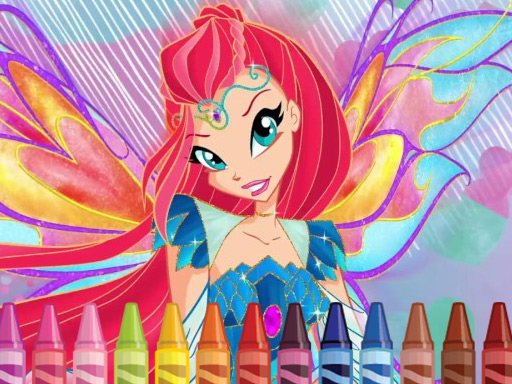
Fairy Coloring Art Game delivers exactly what its name suggests: a straightforward coloring tool with fairy-themed artwork. Its strengths are accessibility and mood—simple controls, no fail states, and sparkly feedback that reinforces each stroke. The adjustable brush sizes add a small layer of technique for detail work. The main limitation is scope: there is no progression, gallery, or additional content beyond saving and sharing finished pictures. It suits children and anyone seeking a brief, relaxing creative session rather than a deep art program.
Description
What You'll Be Coloring
Fairy Coloring Art Game centers on a collection of fairy characters, each with distinct outfits and wings. The artwork is divided into colorable regions—clothing, wings, and background elements—so players can treat each part separately. This structure means the same character can look completely different depending on which sections you color first and how you combine shades. The game is built for children and fairy-tale fans who want a straightforward creative outlet without time limits or competitive pressure.
Choosing Colors and Brushes
After selecting a fairy, you choose a brush size and a color from the on-screen palette. Small brushes work well for facial features and intricate patterns, while larger brushes cover backgrounds and broad sections quickly. You can switch colors and brush sizes at any point, which makes it easy to layer details or test a new combination without starting over. The palette leans toward bright, magical tones, but the exact color choices are left to you.
How Coloring Feels
Every stroke triggers gentle sparkly animations, and fairy-themed music plays throughout the session. These touches are consistent—they don't change based on what you color—but they set a calm, unhurried tone. The interface uses simple tap or click controls on mouse or touch screen, so young players can work independently. There are no scores, timers, or fail states; the only feedback is the visual and audio response to your coloring.
Saving and Sharing Your Work
When a picture is finished, you can save it or share it with family and friends. That saved image becomes a personal record of the session, and because each fairy has multiple colorable areas, the same character can yield several different finished pieces. The game does not include a gallery or progression system beyond this save-and-share step, so the reward is the artwork itself rather than unlocking new content.
Compatibility
FAQ
Comments
Sign in to comment
You must be logged in before posting a review or rating.
No comments yet. Be the first to comment!







Editorial Notes